
Aurora - Light: Office Lighting for Sustained Focus (Without the 3pm Crash)
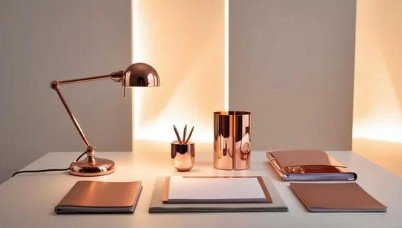
Quick Summary:
Most people blame fading concentration on sleep, stress, or screen time. And yes, all of those matter.
But if you work from home and notice eye fatigue, subtle restlessness at your desk, or the sense that you’re “working” without getting traction, lighting may be part of the reason.
Poor office lighting doesn’t always mean too dark or too bright. More often, it means your setup isn’t supporting how your visual system works in a sustained way over several hours.
Common fatigue culprits include:
• glare on the screen ¹ ²
• contrast (bright above, dim elsewhere) ²
• eyes constantly adjusting ⁵
Three fast fixes
If your eyes feel tired before your brain does, or you lose focus earlier than you should, your lighting may be adding hidden cognitive load. Any home office will benefit from these adjustments:
Sit side-on to a window (not in front and not with the window behind). ¹
Use layered lighting (ambient + a desk lamp), not just one bright overhead light. ¹ ²
Control glare: aim light at the desk surface, not your face or screen. ¹ ²
Buying basics (what to check for on bulbs):
• Neutral bulbs (3500K–4000K) are often most comfortable for sustained work. ³
• Diffused shades/frosted bulbs reduce harsh contrast and hotspots.¹
• For desk lamps, ~500–1,000 lumens is a common task range; ~500 lumens is often cited as comfortable for reading. ⁴
A quick home office lighting self-check
Sit at your desk and ask:
Can I see the bulbs?
Is there a bright window in my direct line of sight or behind me?
Do I have a desk lamp or task light that brightens the desk without reflecting in the screen?
Is there strong contrast between the screen and my surroundings?
Do my eyes feel noticeably more relaxed when I physically move away from the desk area?
If you answered “yes” to some of these questions, lighting is likely contributing to fatigue.
Where to start:
• Yes to 1, 2 or 4 → glare + contrast control.
• Yes to 3 onwards→ task lighting (desk lamp).
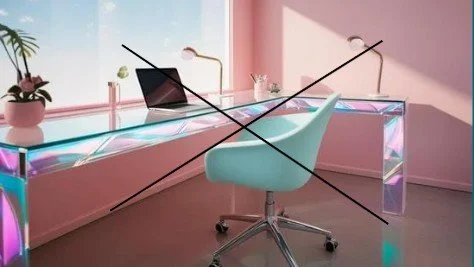
Glare from window and lamp on screen contribute to fatigue.
Practical office lighting - what matters most
Most supportive home office lighting uses layers, each doing a different job:
Natural light (your best “free work light”)
Ambient light (general room light to reduce contrast)
Task lighting (your desk lamp = control dial)
Glare + shadow control (prevents strain)
1) Natural light
Natural light provides excellent work light and is biologically meaningful, but it can also sabotage focus through glare and reflection.² ⁵
The simplest rule: place your desk side-on to the window (left or right).
Avoid:
• window directly in front (high contrast/squinting)
• window directly behind (screen glare/reflection)
Importantly, if the room is bright but your desk sits in a darker corner, your eyes keep adjusting between brightness zones. That repeated micro-adjusting increases fatigue. ⁵
2) Ambient light
Ambient lighting should not “power the desk”.
Its job is to reduce contrast and stop your eyes working too hard. ⁶
When it’s right, the room feels even and calm, without harsh bright spots or dark corners.
10-second check: sit at your desk and look around (not at the bulb).
Ambient light may be inadequate if:
• ceiling is bright but walls/corners are dim ⁴
• desk feels like a spotlight in a cave ⁴
• you feel relief when looking away from the screen ³
• the window is a glowing rectangle in your direct line of sight ⁴
3) Task lighting (the desk lamp)
If you do nothing else, add a task lamp.
This is where most people notice immediate improvement.²
Aim task lighting at the desk surface (keyboard/paper zone), not at the monitor ² ⁷
Glare and reflections are a major driver of discomfort during screen work. ⁷
Best-practice placement:
• lamp slightly to one side
• angled downward onto the desk
• out of your direct line of sight ² ⁷
4) Glare and shadow control
Visual fatigue isn’t only caused by dim lighting. It’s often caused by strong lighting.
Quick fixes:
• avoid bare bulbs in your line of sight (even peripheral vision) ¹
• use frosted bulbs or diffused shades ¹
• avoid light directly behind the screen ⁵ • avoid light directly behind the screen ⁵
• use indirect light where possible (bounce light off walls/ceiling) ¹
• Position the monitor so window light hits at a right angle to reduce glare. ⁶
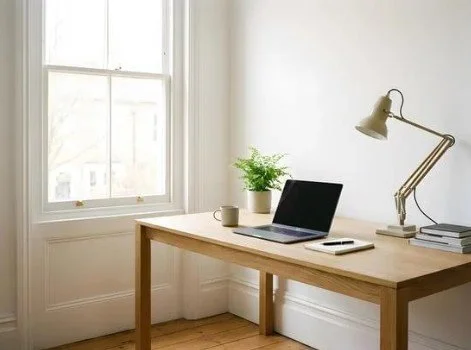
Lighting is consistent in the room. Glare is reduced with right angle position. Lamp is pointed down to the desk, not screen.
What to look for when buying lights Kelvin (K):
Colour temperature ⁸
This is often written in words on a light box such as “warm white” or “daylight”. It is a description of our perception of temperature associated with the colour of light, not the actual effect of being cold or warm.
The following Kelvin ranges apply to both ambient and task lighting. They often appear on the bulb.
• 3500K–4000K is often the sweet spot for sustained focus without harshness. It is typically described as “neutral” white.
• 5000K+ (“daylight”) can feel energising but harsh for some people over time. Higher Kelvins are often used for fine detail or laboratory type settings.
• 2700K–3000K is warm and calming, but can feel too sleepy for detailed work.
Do you know what Kelvin is in your office ceiling light right now? Research shows colour temperature does influence alertness and performance.
Lumens (lm): brightness output
Lumens tell you how much light a bulb produces, not how much reaches your desk. ⁹
Distance, shade and positioning change the final effect. ⁹
Ambient lighting should make the room feel evenly lit and comfortable, therefore it is best to ask yourself, “How many lumens does the room need?”
Given all the variables, here is a practical planning guide:
• 200–400 lumens per square metre = a comfortable ambient range for home office use.
Example totals:
• 10 m² → ~2,000–4,000 lumens
• 12 m² → ~2,400–4,800 lumens
• 15 m² → ~3,000–6,000 lumens
Tip: avoid trying to achieve ambient lighting with one harsh overhead bulb. A calmer approach is multiple softer sources (e.g., ceiling light + diffused desk lamp).¹
Don’t get fixated on this measure, it serves manufacturers as evidence of what they have produced more than being a simple indicator of what you need. However, it is typically on the bulb and can act as a guide.
Diffusion: supportive light vs harsh light
Bare and clear bulbs create bright points, hard shadows and squint-inducing contrast.¹
Diffuse light reduces hotspots and harsh visual contrast, which supports computer work.¹
Task lamp quick wins
Choose a shade that hides the bulb, diffuses light and softens shadows.¹
Lumens: task lighting ~500 lumens is often cited as the minimum for reading, writing, or general work, while 600-1000 may be more appropriate for critical thinking office-based work. ⁴
If you want more certainty, some lamps specify the Lux. This describes how much light hits the surface, while lumens describe total output.⁹
The lux is typically described in relation to distance e.g. “500 lux at 40 centimetres”. Guidelines range from 240 for continuous computer work through to 400 for general mixed tasks such as reading and typing. ¹⁰
Matching lighting to the work you do
Most tasks overlap, so focus on flexibility:
• Paper-heavy work (reading/writing): stronger task light and reduced shadowing help.²
• Screen-heavy work (Zoom/admin): moderate ambient light, diffuse sources and strong glare control matter most.²
• If your day involves multiple types of tasks, a dimmable lamp is a practical way to adjust for eye comfort and can help take the angst out of finding the “perfect bulb”.
The overlooked factor: sensory sensitivity
People can respond differently to the same lighting.
Some tolerate cooler/brighter setups easily. Others find them draining or overstimulating. If you get headaches or feel “wired but tired”, warm-to-neutral flexibility may matter more.
Your individual sensory threshold needs to be factored in to your ideal office lighting, along with, the size of your office, the tasks you do and the position of your desk.
Bottom line: productivity is about support not stimulation
The strongest levers for focus-friendly lighting:
• glare control + diffusion ¹
• task lighting at the desk ²
• even ambient light ⁶
• dimmability ²
When lighting is right, work feels easier because your nervous system isn’t fighting the room while you’re trying to think.
Where do I start?
Don’t feel overwhelmed by the technical insights, they are guides to help you make informed decisions. Think in ranges and adapt to the variables that are unique to you, such as the size of your office, your sensory comfort zones and the tasks you do.
A good place to begin could be:
Reposition your desk side-on to the window. ⁶
Add diffused lamps to remove harsh contrast and dark corners. ¹
Add a desk lamp angled down onto the desk surface (not the monitor). ² ⁶
Understanding how home office lighting affects your productivity is just one aspect of how light can influence your mood, thoughts and behaviour. Light, like other sensory experiences, plays a powerful role in how we feel and function every day.
If you would like to explore how sight, sound and the other senses, influence your day, explore my book, Come to Your Senses.
References
1. OSHA. (n.d.) Computer Workstations eTool – Workstation Environment. Available at: https://www.osha.gov/etools/computer-workstations/workstation-environment
2. WorkSafe Queensland. (2020) Visual comfort for computer work. Available at: https://www.worksafe.qld.gov.au/safety-and-prevention/hazards/hazardous-manual-tasks/working-with-computers/visual-comfort-for-computer-work
3. Dick, M.et al. (2024) ‘Effects of personalized lighting on subjective ratings, cognitive performance, and psychological stress response in a simulated office environment. LEUKOS – The Journal of the illuminating Engineering Society. Available at: https://www.tandfonline.com/doi/full/10.1080/15502724.2023.2292960#d1e214
4. BENQ. (2023) How many lumens for a desk lamp: Is 500 lumens good enough for reading? Available at: https://www.benq.com/en-au/knowledge-center/knowledge/how-many-lumens-for-a-desk-lamp.html
5. Canadian Centre for Occupational Health and Safety. (2025) Lighting ergonomics. Available at: https://www.ccohs.ca/oshanswers/ergonomics/lighting/lighting_survey.html
6. BENQ. (n.d.) How lighting ergonomics boosts productivity and wellbeing. Available At: https://www.ccohs.ca/oshanswers/ergonomics/lighting/lighting_survey.html
7. BENQ (2024) How to master desk lamp placement: A practical guide. https://www.benq.com/en-us/knowledge-center/knowledge/how-to-master-desk-lamp-placement-guide.html
8. Richards, N. (2025) Come to Your Senses. Hembury Books, pp. 118–119.
9. Waveform Lighting. (n.d.) What is the difference between lux and lumens? Available at: https://www.waveformlighting.com/home-residential/what-is-the-difference-between-lux-and-lumens
10. WorkSafe Victoria. (n.d.) Designing a healthy and safe working environment. Available at: https://www.worksafe.vic.gov.au/office-health-and-safety-designing-healthy-and-safe-working-environment